Computer Slowness
Updated: 05/10/2023
Article #: 91
Tags: Computer Slowness, PC Slow, Slow
Troubleshooting Steps:
1)Restart your Computer
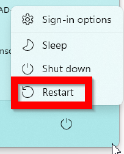
Click on the Power button
Select Restart
2)Run Windows Updates
Click on Search Box or Search icon (next to the Start menu/Windows button)
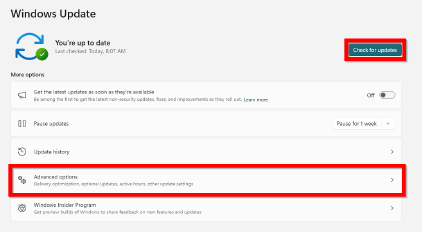
Search for Windows Update Settings and open
Click on Check for Updates
Click on Advanced Options>Optional Updates
Select Optional Updates to install (especially firmware)
Allow updates to complete and restart PC after
3)If the Previous Steps Fail, Please Create a Ticket and Include:
Software that is usually affected
When the issue started
Specific symptoms of slowness you are experiencing
|
Rate this Topic:
|
|||
|
